Tampilkan postingan dengan label wii. Tampilkan semua postingan

Nintendo Wii U, Nintendo's Next Console!

Posted by Unknown Selasa, 07 Juni 2011 0 komentar

Nintendo's just showing off it's newest console the Nintendo Wii U and once again they are aiming to change the game by innovating how wii (couldn't resist) interact with the games.  First and foremost the console is completely compatible with all of the Wii's software and accessories!!! That's right so ALL of your games and wacky controllers, boards, nunchucks, etc will work with the new console! The system will FINALLY feature full 1080p HD graphics allowing the Wii U to compete with Xbox and PS3 with more hardcore games like Madden and shooters (which was a big downside to the original Wii in my opinion).


In addition to the enhanced graphical and computing power a lot of the new experience focuses around the new Wii U contoller.  The controller in addition to a pretty standard button layout (with dual analog) houses a 6.2" touch screen, stylus for writing and drawing, front facing camera (for chat) and motion sensing!  Check out the videos for a better idea of the innovative ways this can be used in gameplay.  It will really open up the door to limitless creative applications for game designers! We'll have to wait and see but this could really be a winner. Nintendo continually proves to be true innovators in the gaming industry!


I'm really feeling the idea of being able to continue my game without a TV allowing me to watch TV or let others around me watch TV while I continue gaming.  And the in game applications seem amazing too! I can't help but feel like this could be everything the Dreamcast controller dreamed of being and soo much more!

Still not sure but I may be grabbing one of these at launch if for nothing else than the Nintendo exclusives; Zelda, Mario and Mario Kart will be crazy on this!!! Hopefully they get the online gaming part right. And hopefully they release one in black.

Sources:
Engadget
IGN


Baca Selengkapnya ....

Xoom or Wait?

Posted by Unknown Senin, 04 April 2011 0 komentar

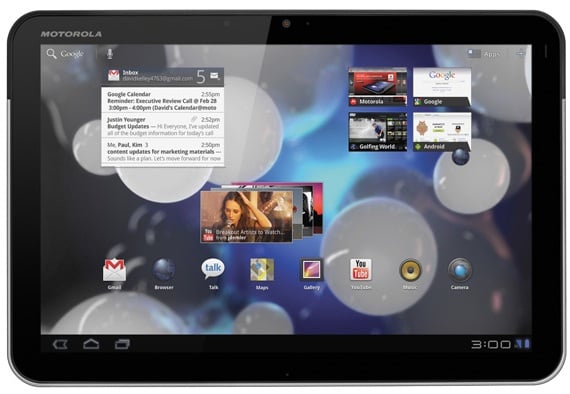
So after a long tablet-deprived wait I finally got my hands on a WiFi-Only Motorola Xoom.  In exchange for $600 bucks the Wifi Xoom is basically identical to its Verizon 3G/4G enabled counterpart. The Xoom has a  1Ghz dual core Tegra 2 processor, front and back cameras (5MP shooter on back with a front facing cam for video chat), Android 3.0 Honeycomb (Google's newest version of Android optimized for tablets) and a 10.1" Display.

I immediately fell in love with the Xoom, but after a few days that all changed because of glitches and bugs.  I really liked having an Android tablet and would strongly recommended checking out the Xoom, but I returned mine.  There are just too many other Android Tablets on the horizon.  HTC, LG, Samsung, Asus, and Acer all have some pretty competitive tablets coming in the next few months; not to mention tablets from HP (Palm) and Blackberry.  The Xoom's quirks and bugs will be resolved in the coming weeks undoubtedly, but the Xoom is only the tip of the Tablet-iceberg.  Many more options are coming and I will be holding out to explore them.  More competition means more variety in features and hopefully more competitive pricing. So the big question for those looking for and Android tablet is Xoom or Wait?

Check out my video review of the Xoom below. Let me know what you think


Motorola XOOM Tablet Specs
OS
Android 3.0 (Honeycomb)
Differentiation
Larger and higher-resolution display in smaller form-factor, first tablet with Honeycomb software, dual-core 1GHz processor, and a wide range of docking options
Dimensions
249.1mm (h) x 167.8mm (w) x 12.9mm (d)
Display
10.1” 1280x800 resolution
Weight
~25 ounces
Processor
1GHz dual-core processor
Battery
Up to 10 hours video playback
Connectivity
3.5mm, micro USB 2.0 HS, Corporate Sync, Bluetooth 2.1 + EDR + HID
Network
802.11n b/g/n
Messaging/Web/Apps
Email (Corporate Sync, Google Mail, POP3/IMAP embedded) , WebKit w/ Flash
Audio
AAC, AAC+, AMR NB, AMR WB, MP3, XMF
Video
HD capture/playback/streaming, H.263, H.264, MPEG4
Camera
5 MP rear-facing camera with dual LED flash/2MP front-facing webcam
Memory
32GB on board user memory, microSD card support after future software update, 1GB DDR2 RAM

Some of the upcoming Tablets that I am waiting to see:

HTC Evo View 4G/HTC Flyer


Asus Eee Pad Transformer


Asus Eee Pad Slider

Baca Selengkapnya ....

Xbox Kinect..... R.I.P. Wii

Posted by Unknown Minggu, 07 November 2010 0 komentar
I've been waiting a long time since I first saw it debuted as Project Natal, I finally got my hands on Microsoft Kinect Xbox 360's new motion sensing peripheral.  Kinect takes a different approach to motion based controls than the Wii or even PS3 bypassing controllers of any kind for a sensor capable of capturing motion and providing true "controller free" gaming.  I was very skeptical that this would actual work as promised but I have to say my skepticism was laid to rest once I got a chance to try it myself.


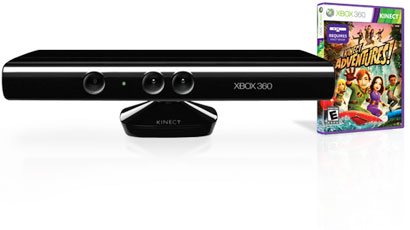
Diving into the box you have your typical Xbox 360 setup plus the Kinect sensor bar pictured to the right. This sensor bar is stuffed full of high tech goodness. Before you scoff at the $150 price tag understand this is not just a camera.  Kinect sits on a motorized pivoting base that allows it to adjust itself for an optimal viewing angle.  Housed inside the "bar" part Kinect features an RGB camera, depth sesnor and 4 microphones running software that allows full body 3D motion capture, facial recognition and voice recognition. The 4 mic setup allows Kinect to  locate your voice and suppress ambient noise in your surroundings for things like party chat without having to use headsets.  Kinect also uses a inrared projector to "see" in 3D under any ambient light conditions.  This 3D view helps Kinect calibrate and adjust to varying setups, player positioning and the presence of furniture or any other object.  Kinect is capable of simultaneously tracking up to 6 people. In addition to gaming Kinect adds voice navigation to some of menus and media playback.

After the last few years playing the Wii I honestly had lost faith in the concept of motion sensing based video games. I mean teh Wii is definitely fun but after playing some of the games you definitely see it has some major limitations that I think Kinect may be able to over come.  Kinect provides a much more immersive gaming experience because it can "see" you.  It can track your body movements, log you in with facial recognition, obey your voice commands and take pictures of you and lay that over the 3D image of you putting you right in the game.  I am not only impressed with the games I've tried so far but with the potential of Kinect.  The dance game Dance Central absolutely amazed me.  Unlike most dance games you aren't just stepping on arrows or buttons along to a beat.  This thing actually watches your movements! You've got to move your hips, arms and legs to the beat.  Kinect is sensitive enough to know if your half-assing it and it will be reflected in your scores! I highly recommend dropping into your local Bestbuy to give Kinect a try its one of those things you just have to try for yourself.


The add on for your Xbox 360 cost $150 or you can get a bundle with Kinect and the newer slimmer sleeker Xbox 360 S and games are strategically placed at $50 (just like Wii titles). I grabbed mine at mid-night at Bestbuy and got a small gift package with a Kinect bag, water bottle and towel, all of which were appreciated after working up a sweat playing Kinect Adventures the bundled game that comes along with Kinect. 


One down side to Kinect is the fact that you need space! Microsoft recommends at least 6-8ft between Kinect and the playing area; and that's just the minimum recommendation.  You obviously would want to have more space for two player games and would want to move furniture out of the way. I found that the space in my basement is just a little too small for optimal play space after nearly breaking my toe attempting to kick a virtual ball and hitting my head on the ceiling while jumping over a virtual hurdle.

Kinect can be mounted below or above the TV.  Placing it above the TV seems to help in a less than ideal sized space; Bestbuy sells a special mount to securely place your Kinect on top of your TV for $40 bucks. Unfortunately, this  mount does not work with TV's that are mounted on the wall, so to remedy this situation I created my own wall mount for about 8 bucks.  A piece of wood, a shelf mount, a few screws and some black spray paint and BOOM a custom Kinect mount!


Video source and for more detail visit Engadget's full review


Baca Selengkapnya ....

Wiimote Controller Support for the HTC Evo with Custom Rom

Posted by Unknown Sabtu, 31 Juli 2010 0 komentar
Things keep getting better for the Evo this week first the Froyo update is announced and now shdwknt has posted video of his Evo successfully using the Wiimote as a bluetooth controller on his various emulators over on PPCGeeks.com.  This lets him play classics like SNES, Genesis, and even Playstation using  WiiRemote as a controller.  With the Evo's kickstand and multi-player support the Evo just got even better. I tried this app before and it wasn't compatible with HTC Sense so it seems to work for him because he is using the custom rom from Cyanogen that does not use HTC Sense. Hopefully someone will find a way to use this and keep HTC Sense cause I don't wanna lose it but I can't wait to get some Mario and Sonic crackin with a REAL controller!!!!


Baca Selengkapnya ....
Trik SEO Terbaru support Online Shop Baju Wanita - Original design by Bamz | Copyright of android vs apple.